
Mìng Lìng - 命令
A Rust CLI framework for many subcmds & complex workflows, reduces boilerplate via proc macros, focus on biz logic




> [!WARNING]
>
> **Note**: Mingling is still under active development, and its API may change. Feel free to try it out and give us feedback!
> **Hint**: This note will be removed in version `0.5.0`
## 📚 Contents
- [🚀 Intro](#🚀-intro)
- [⚡ Quick Start](#⚡-quick-start)
- [🧠 Core Concepts](#🧠-core-concepts)
- [🏗️ Project Structure](#🏗️-project-structure)
- [💡 Example Projects](#💡-example-projects)
- [👣 Next Steps](#👣-next-steps)
- [🗺️ Roadmap](#🗺️-roadmap)
- [🚫 Unplanned Features](#🚫-unplanned-features)
- [📄 License](#📄-license)
## 🚀 Intro
[`Mingling`](https://github.com/CatilGrass/mingling) is a **proc-macro and type system-based** Rust CLI framework, suitable for developing complex command-line programs with numerous subcommands.
> BTW: Its name comes from the Chinese Pinyin "mìng lìng", meaning "Command". 😄
## ⚡ Quick Start
> To use a release version of `Mingling`, get the latest version from [`crates.io`](https://crates.io/crates/mingling)
>
> To use the latest version, pull the project from the `main` branch on `github`
If you have [`cargo-generate`](https://cargo-generate.github.io/cargo-generate/) installed, you can quickly generate a new project template:
```bash
cargo generate --git catilgrass/mingling-template
```
Otherwise, add `Mingling` to your `Cargo.toml`:
```toml
# From crates.io
mingling = "0.1.8"
# From GitHub
mingling = { git = "https://github.com/catilgrass/mingling", branch = "main" }
```
The example below shows how to use `Mingling` to create a simple CLI program:
```rust
use mingling::macros::{dispatcher, gen_program, r_println, renderer};
fn main() {
let mut program = ThisProgram::new();
program.with_dispatcher(HelloCommand);
// Execute
program.exec();
}
// Define command: " hello"
dispatcher!("hello", HelloCommand => HelloEntry);
// Render HelloEntry
#[renderer]
fn render_hello_world(_prev: HelloEntry) {
r_println!("Hello, World!")
}
// Fallbacks
#[renderer]
fn fallback_dispatcher_not_found(prev: DispatcherNotFound) {
r_println!("Dispatcher not found for command `{}`", prev.join(", "))
}
#[renderer]
fn fallback_renderer_not_found(prev: RendererNotFound) {
r_println!("Renderer not found `{}`", *prev)
}
// Collect renderers and chains to generate ThisProgram
gen_program!();
```
Output:
```
> mycmd hello
Hello, World!
> mycmd hallo
Dispatcher not found for command `hallo`
```
Now, let's see the full usage of **Mingling**: The following example shows how to use `Mingling` to create a complete CLI program with `help`, `completion`, `fallback`, and `parser` features:
```rust
use mingling::{
ShellContext, Suggest,
macros::{
chain, completion, dispatcher, gen_program, help, pack, r_println, renderer, suggest,
},
parser::AsPicker,
setup::BasicProgramSetup,
};
fn main() {
// Initialize program
let mut program = ThisProgram::new();
// Load plugins
program.with_setup(BasicProgramSetup);
program.with_dispatcher(CompletionDispatcher);
// Load commands
program.with_dispatcher(GreetCommand);
// Run program
program.exec();
}
// Define dispatcher `greet`
dispatcher!("greet", GreetCommand => GreetEntry);
// Define intermediate type `StateGreeting`
pack!(StateGreeting = String);
// Define `greet` command help
#[help]
fn help_greet_command(_prev: GreetEntry) {
r_println!("Usage: greet ");
}
// Define `greet` command completion
#[completion(GreetEntry)]
fn comp_greet_command(ctx: &ShellContext) -> Suggest {
if ctx.previous_word == "greet" {
return suggest! {
"Alice",
"Bob",
"Peter"
};
}
return suggest!();
}
// Define chain, parsing `GreetEntry` into `StateGreeting`
#[chain]
fn parse_name_to_greet(prev: GreetEntry) -> NextProcess {
let state_greeting: StateGreeting =
prev.pick_or::((), "World").unpack().into();
state_greeting
}
// Render `StateGreeting`
#[renderer]
fn render_state_greeting(prev: StateGreeting) {
r_println!("Hello, {}!", *prev);
}
// Define fallback logic when no matching dispatcher is found
#[renderer]
fn fallback_no_dispatcher_found(prev: DispatcherNotFound) {
r_println!("Command \"{}\" not found.", prev.join(" "));
}
// Generate program
gen_program!();
```
Output:
```
~> mycmd greet
Hello, World!
~> mycmd greet Alice
Hello, Alice!
~> mycmd greet --help
Usage: greet
~> mycmd great
Command "great" not found.
```
## 🧠 Core Concepts
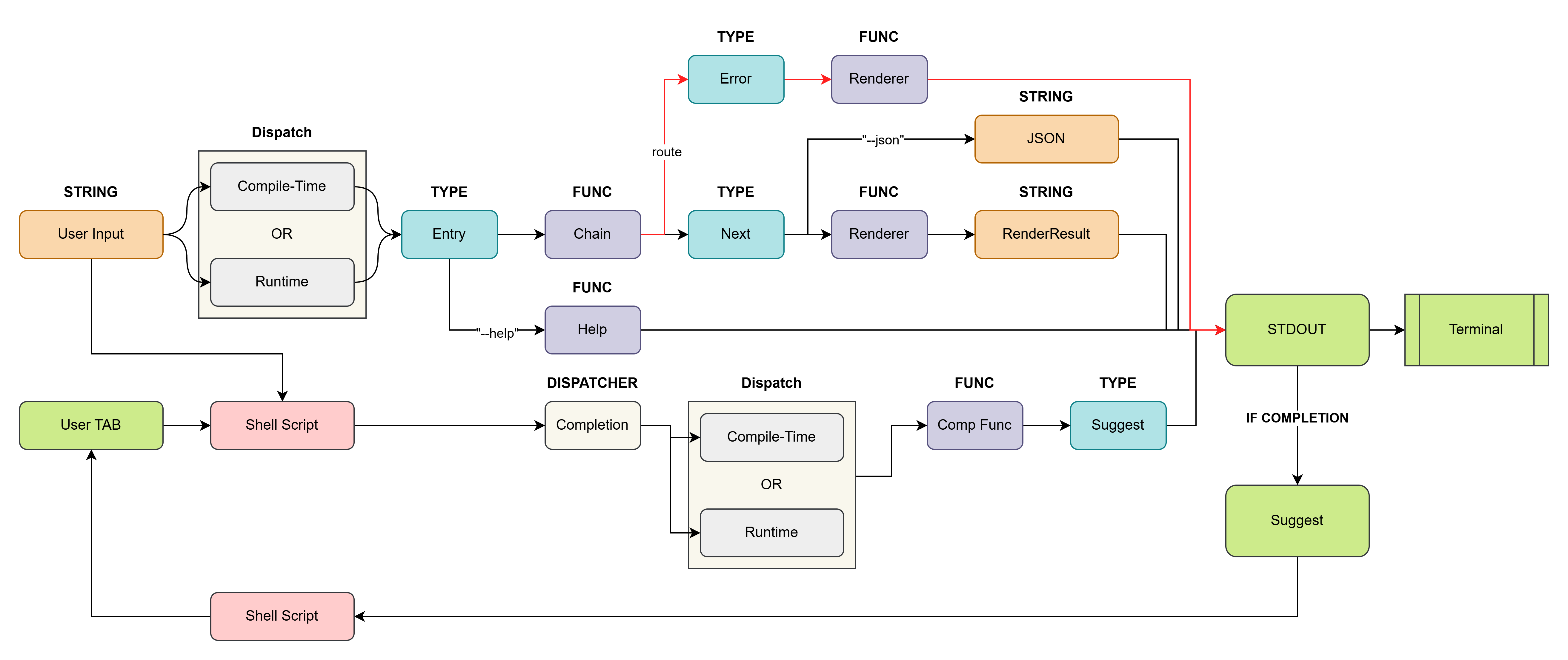
Mingling abstracts command execution into the following parts:
1. **Dispatcher** - Routes user input to a specific renderer or chain based on the command node name.
2. **Chain** - Transforms the incoming type into another type, passing it to the next chain or renderer.
3. **Renderer** - Stops the chain and prints the currently processed type to the terminal.
4. **Program** - Manages the lifecycle and configuration of the entire CLI application.
Architecture Diagram (click to expand)
## 🏗️ Project Structure
The Mingling project consists of two main parts:
- **[mingling/](mingling/)** - The core runtime library, containing type definitions, error handling, and basic functionality.
- **[mingling_macros/](mingling_macros/)** - The procedural macro library, providing declarative macros to simplify development.
## 💡 Example Projects
- **[`examples/example-basic/`](examples/example-basic/src/main.rs)** - A simple "Hello, World!" example demonstrating the most basic usage of a Dispatcher and Renderer.
- **[`examples/example-async/`](examples/example-async/src/main.rs)** - Based on `example-basic`, demonstrates how to integrate an async runtime
- **[`examples/example-picker/`](examples/example-picker/src/main.rs)** - Demonstrates how to use a Chain to process and transform command arguments.
- **[`examples/example-general-renderer/`](examples/example-general-renderer/src/main.rs)** - Shows how to use a general renderer for different data types (e.g., JSON, YAML, TOML, RON).
- **[`examples/example-completion/`](examples/example-completion/src/main.rs)** - An example implementing auto-completion for the shell.
## 👣 Next Steps
You can read the following docs to learn more about the `Mingling` framework:
- Check out **[Mingling Helpdoc](https://catilgrass.github.io/mingling/)** to learn the basics.
- Check out **[Mingling Examples](examples/)** to learn about the core library.
- Check out **[Mingling Docs](https://docs.rs/mingling/latest/mingling/)** to learn how to use the macro system and explore the full API.
## 🗺️ Roadmap
- [x] core: \[[0.1.4](https://docs.rs/mingling/0.1.4/mingling/)\] General Renderers *( Json, Yaml, Toml, Ron )*
- [x] core: \[[0.1.5](https://docs.rs/mingling/0.1.5/mingling/)\] Completion *( Bash Zsh Fish Pwsh )*
- [x] core: \[[0.1.6](https://docs.rs/mingling/0.1.6/mingling/)\] Smarter Completion Suggest Generation
- [x] \[[0.1.7](https://docs.rs/mingling/0.1.7/mingling/)\] Clap Parser Support
- [x] core: \[[0.1.7](https://docs.rs/mingling/0.1.7/mingling/)\] Help System
- [x] mling: \[[0.1.7](https://docs.rs/mingling/0.1.7/mingling/)\] Mingling-CLI Tool ( `mling` )
- [x] core: \[[0.1.8](https://docs.rs/mingling/0.1.8/mingling/)\] Compile-Time Dispatcher Tree
- [ ] core: \[**0.1.9**\] Debug Toolkits ( `InvokeStackDisplay` )
- [ ] core: \[**0.1.9**\] REPL Mode ( `program.exec_repl();` )
- [ ] ...
- [ ] \[**0.2.0**\] Helpdoc Maker
## 🚫 Unplanned Features
While Mingling has several common CLI features that are **NOT PLANNED** to be directly included in the framework.
This is because the Rust ecosystem already has excellent and mature crates to handle these issues, and Mingling's design is intended to be used in combination with them.
- **Colored Output**: To add color and styles (bold, italic, etc.) to terminal output, consider using crates like [`colored`](https://crates.io/crates/colored) or [`owo-colors`](https://crates.io/crates/owo-colors). You can integrate their types directly into your renderers.
- **I18n**: To translate your CLI application, the [`rust-i18n`](https://crates.io/crates/rust-i18n) crate provides a powerful internationalization solution that you can use in your command logic and renderers.
- **Progress Bars**: To display progress indicators, the [`indicatif`](https://crates.io/crates/indicatif) crate is the standard choice.
- **TUI**: To build full-screen interactive terminal applications, it is recommended to use a framework like [`ratatui`](https://crates.io/crates/ratatui) (formerly `tui-rs`).
## 📄 License
This project is licensed under the MIT License.
See [LICENSE-MIT](LICENSE-MIT) or [LICENSE-APACHE](LICENSE-APACHE) file for details.